
Available tables

  • runs: contains all task run data including status, timing, costs, and metadata
  • metrics: contains metrics data for your runs including CPU, memory, and your custom metrics.

Using the Query dashboard

Navigate to the Query page to write and execute queries. The dashboard provides:
  • AI-powered query generation - Describe what you want in natural language
  • Syntax highlighting - SQL syntax highlighting for better readability
  • Query history - Access your previous queries
  • Interactive help - Built-in documentation for TRQL syntax and functions
  • Export options - Download results as JSON or CSV
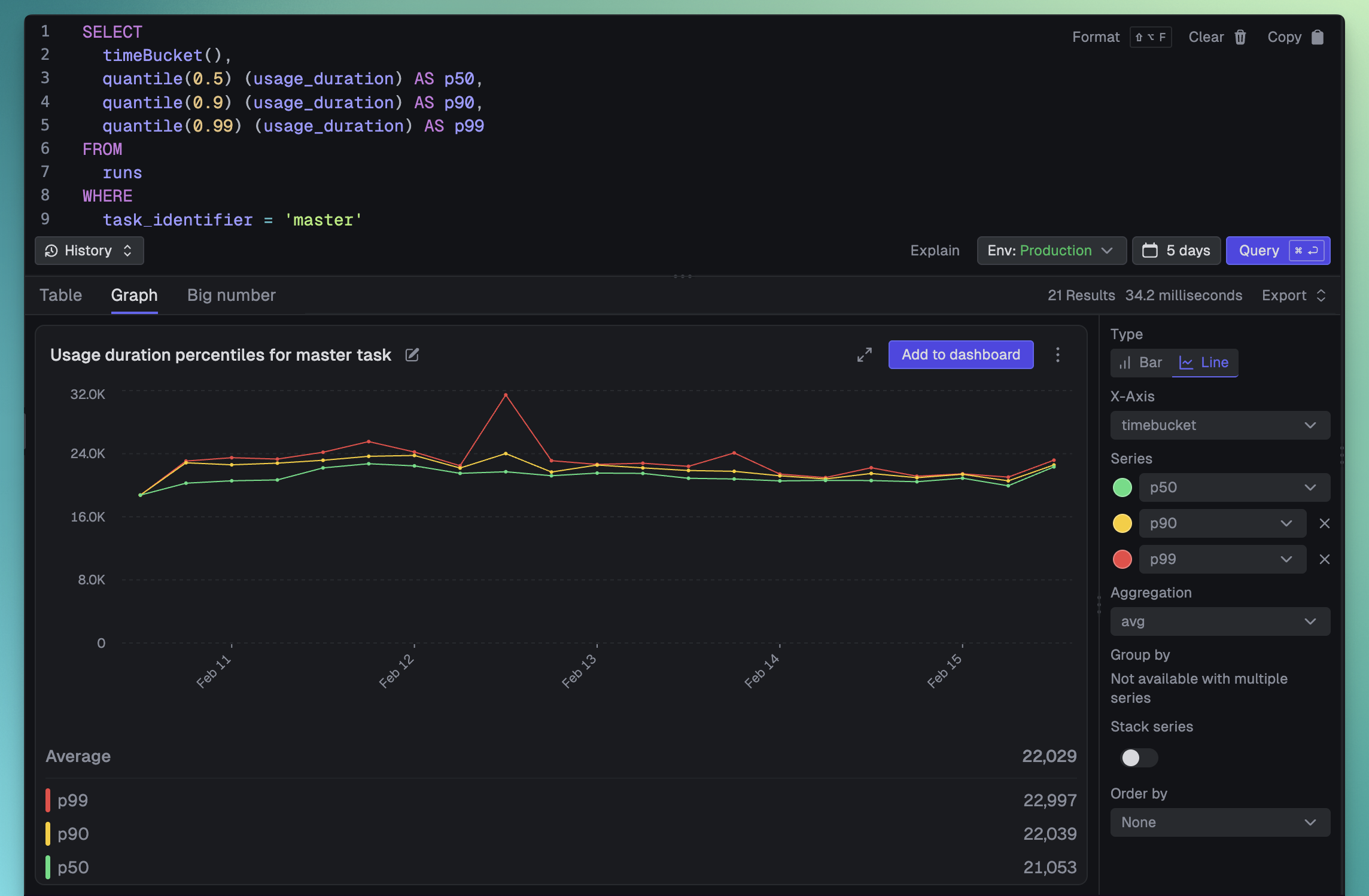
The Query dashboard

Querying from the SDK

Use query.execute() to run TRQL queries programmatically from your backend code:
import { query } from "@trigger.dev/sdk";

// Basic query with defaults (environment scope, json format)
const result = await query.execute("SELECT run_id, status FROM runs LIMIT 10");
console.log(result.results); // Array<Record<string, any>>

Type-safe queries

Use the QueryTable type for nice inferred types in your query results:
import { query, type QueryTable } from "@trigger.dev/sdk";

// Type-safe query using QueryTable with specific columns
const typedResult = await query.execute<QueryTable<"runs", "run_id" | "status" | "triggered_at">>(
  "SELECT run_id, status, triggered_at FROM runs LIMIT 10"
);

typedResult.results.forEach((row) => {
  console.log(row.run_id, row.status); // Fully typed!
});

Query options

import { query } from "@trigger.dev/sdk";

const result = await query.execute("SELECT COUNT(*) as count FROM runs", {
  // Scope: "environment" (default), "project", or "organization"
  scope: "project",
  // Time period using shorthand (e.g., "7d", "30d", "1h")
  period: "7d",
  // Or use explicit time range
  // from: new Date("2024-01-01"),
  // to: new Date("2024-01-31"),

  // Response format: "json" (default) or "csv"
  format: "json",
});

CSV export

Export query results as CSV by setting format: "csv":
const csvResult = await query.execute("SELECT run_id, status, triggered_at FROM runs", {
  format: "csv",
  period: "7d",
});

const lines = csvResult.results.split("\n");
console.log(lines[0]); // CSV header row

Querying from the REST API

Execute queries via HTTP POST to /api/v1/query:
curl -X POST https://api.trigger.dev/api/v1/query \
  -H "Authorization: Bearer YOUR_SECRET_KEY" \
  -H "Content-Type: application/json" \
  -d '{
    "query": "SELECT run_id, status FROM runs LIMIT 10",
    "scope": "environment",
    "period": "7d",
    "format": "json"
  }'
See the API reference for full details.

TRQL syntax guide

Basic queries

Select columns from a table:
SELECT run_id, task_identifier, status
FROM runs
LIMIT 10
Alias columns with AS:
SELECT task_identifier AS task, count() AS total
FROM runs
GROUP BY task

Using *

Note that when you use SELECT * we don’t return all the columns, we only return the core columns. This is for performance reasons (the underlying ClickHouse database is columnar and selecting lots of columns isn’t efficient). You should specify the columns you want to return.

Filtering with WHERE

Use comparison operators:
SELECT run_id, task_identifier FROM runs
WHERE status = 'Failed'
Available operators:
-- Comparison operators
WHERE status = 'Failed'           -- Equal
WHERE status != 'Completed'       -- Not equal
WHERE attempt_count > 3           -- Greater than
WHERE attempt_count >= 3          -- Greater than or equal
WHERE attempt_count < 5           -- Less than
WHERE attempt_count <= 5          -- Less than or equal

-- IN for multiple values
WHERE status IN ('Failed', 'Crashed')

-- LIKE for pattern matching (% = wildcard)
WHERE task_identifier LIKE 'email%'

-- ILIKE for case-insensitive matching
WHERE task_identifier ILIKE '%send%'

-- BETWEEN for ranges
WHERE triggered_at BETWEEN '2024-01-01' AND '2024-01-31'

-- NULL checks
WHERE completed_at IS NOT NULL
WHERE completed_at IS NULL

-- Array column checks
WHERE has(tags, 'user_12345')
WHERE notEmpty(tags)
WHERE hasAny(tags, array('user_12345', 'user_67890'))
WHERE hasAll(tags, array('user_12345', 'user_67890'))
WHERE indexOf(tags, 'user_12345') > 0
WHERE arrayElement(tags, 1) = 'user_12345'

Sorting and limiting

Sort results with ORDER BY:
SELECT run_id, compute_cost, triggered_at
FROM runs
ORDER BY compute_cost DESC, triggered_at ASC
LIMIT 50

Grouping and aggregation

Use GROUP BY with aggregate functions:
SELECT
  task_identifier,
  avg(value) AS avg_memory
FROM metrics
WHERE metric_name = 'system.memory.usage'
GROUP BY task_identifier
ORDER BY avg_memory DESC
LIMIT 20

Available functions

TRQL provides a rich set of functions for data analysis.

Aggregate functions

  • count() - Count rows
  • countIf(col, cond) - Count rows matching condition
  • countDistinct(col) - Count unique values
  • sum(col) - Sum of values
  • sumIf(col, cond) - Sum values matching condition
  • avg(col) - Average of values
  • min(col) - Minimum value
  • max(col) - Maximum value
  • median(col) - Median value (50th percentile)
  • quantile(p)(col) - Value at percentile p (0-1)
  • stddevPop(col) - Population standard deviation
  • stddevSamp(col) - Sample standard deviation
Example:
SELECT
  task_identifier,
  count() AS total_runs,
  avg(usage_duration) AS avg_duration_ms,
  median(usage_duration) AS median_duration_ms,
  quantile(0.95)(usage_duration) AS p95_duration_ms
FROM runs
GROUP BY task_identifier

Date/time functions

Time bucketing:
-- Auto-bucket by time period based on query's time range
SELECT timeBucket(), count() AS runs
FROM runs
GROUP BY timeBucket()
Date extraction:
SELECT
  toYear(triggered_at) AS year,
  toMonth(triggered_at) AS month,
  toDayOfWeek(triggered_at) AS day_of_week,
  toHour(triggered_at) AS hour
FROM runs
Date truncation:
SELECT
  toStartOfDay(triggered_at) AS day,
  count() AS runs_per_day
FROM runs
GROUP BY day
ORDER BY day DESC
Date arithmetic:
-- Add/subtract time
SELECT dateAdd('day', 7, triggered_at) AS week_later
FROM runs

-- Calculate differences
SELECT dateDiff('minute', executed_at, completed_at) AS duration_minutes
FROM runs
WHERE completed_at IS NOT NULL
Common date functions:
  • now() - Current date and time
  • today() - Current date
  • toDate(dt) - Convert to date
  • toStartOfDay(dt), toStartOfHour(dt), toStartOfMonth(dt) - Truncate to start of period
  • formatDateTime(dt, format) - Format datetime as string

String functions

SELECT
  lower(status) AS status_lower,
  upper(status) AS status_upper,
  concat(task_identifier, '-', status) AS combined,
  substring(run_id, 1, 8) AS short_id,
  length(task_identifier) AS name_length
FROM runs
Common string functions:
  • length(s) - String length
  • lower(s), upper(s) - Case conversion
  • concat(s1, s2, ...) - Concatenate strings
  • substring(s, offset, len) - Extract substring
  • trim(s) - Remove whitespace
  • replace(s, from, to) - Replace occurrences
  • startsWith(s, prefix), endsWith(s, suffix) - Check prefixes/suffixes

Conditional functions

SELECT
  run_id,
  if(status = 'Failed', 1, 0) AS is_failed,
  multiIf(
    status = 'Completed', 'ok',
    status = 'Failed', 'bad',
    'other'
  ) AS status_category,
  coalesce(completed_at, triggered_at) AS end_time
FROM runs
  • if(cond, then, else) - Conditional expression
  • multiIf(c1, t1, c2, t2, ..., else) - Multiple conditions (like CASE)
  • coalesce(a, b, ...) - First non-null value

Math functions

SELECT
  round(compute_cost, 4) AS cost_rounded,
  ceil(usage_duration / 1000) AS duration_seconds_up,
  floor(usage_duration / 1000) AS duration_seconds_down,
  abs(compute_cost) AS cost_abs
FROM runs

Array functions

Useful for working with tags and other array columns:
SELECT
  run_id,
  tags,
  length(tags) AS tag_count,
  has(tags, 'user_12345') AS is_production,
  arrayJoin(tags) AS individual_tag  -- Expand array to rows
FROM runs
WHERE notEmpty(tags)

JSON functions

Extract data from JSON columns (like runs.output, runs.error, metrics.attributes, etc.):
SELECT
  run_id,
  output.message AS output_message,
  output.count AS count,
  output.error != NULL AS has_error
FROM runs
WHERE output IS NOT NULL

Query scopes

Control what data your query can access:
  • environment (default) - Query runs in the current environment only
  • project - Query runs across all environments in the project
  • organization - Query runs across all projects in the organization
// Query across all environments in a project
const result = await query.execute("SELECT environment, count() FROM runs GROUP BY environment", {
  scope: "project",
});

Time ranges

We recommend avoiding adding triggered_at in the actual TRQL query. The dashboard, API, and SDK have a time filter that is applied automatically and is easier to work with. It means the queries can be executed with multiple periods easily.

Using period shorthand

await query.execute("SELECT count() FROM runs", {
  period: "4d", // Last 4 days
});

// Supported periods: "1h", "6h", "12h", "1d", "7d", "30d", "90d", etc.

Using explicit dates

await query.execute("SELECT count() FROM runs", {
  from: new Date("2024-01-01"),
  to: new Date("2024-01-31"),
});

// Or use Unix timestamps
await query.execute("SELECT count() FROM runs", {
  from: Date.now() - 7 * 24 * 60 * 60 * 1000, // 7 days ago
  to: Date.now(),
});

Example queries

Failed runs (in the last 24 hours)

SELECT
  task_identifier,
  run_id,
  error,
  triggered_at
FROM runs
WHERE status = 'Failed'
ORDER BY triggered_at DESC
With the time filter set to 24h.

Task success rate by day

SELECT
  toDate(triggered_at) AS day,
  task_identifier,
  countIf(status = 'Completed') AS completed,
  countIf(status = 'Failed') AS failed,
  round(completed / (completed + failed) * 100, 2) AS success_rate_pct
FROM runs
WHERE status IN ('Completed', 'Failed')
GROUP BY day, task_identifier
ORDER BY day DESC, task_identifier

Top 10 most expensive runs

SELECT
  run_id,
  task_identifier,
  compute_cost,
  usage_duration,
  triggered_at
FROM runs
WHERE compute_cost > 0
ORDER BY compute_cost DESC
LIMIT 10

Average compute duration over time

SELECT
  timeBucket() AS time,
  task_identifier,
  avg(usage_duration) AS avg_duration_ms,
  count() AS run_count
FROM runs
WHERE usage_duration IS NOT NULL
GROUP BY time, task_identifier
ORDER BY time ASC

Runs by queue and machine

SELECT
  queue,
  machine,
  count() AS run_count,
  countIf(status = 'Completed') AS completed,
  countIf(status = 'Failed') AS failed
FROM runs
GROUP BY queue, machine
ORDER BY queue, machine

CPU utilization over time

Track process CPU utilization bucketed over time.
SELECT
  timeBucket(),
  avg(value) AS avg_cpu
FROM metrics
WHERE metric_name = 'process.cpu.utilization'
GROUP BY timeBucket
ORDER BY timeBucket
LIMIT 1000

Memory usage by task (past 7d)

Average memory usage per task identifier over the last 7 days.
SELECT
  task_identifier,
  avg(value) AS avg_memory
FROM metrics
WHERE metric_name = 'system.memory.usage'
GROUP BY task_identifier
ORDER BY avg_memory DESC
LIMIT 20

Available metric names

List all distinct metric names collected in your environment.
SELECT
  metric_name,
  count() AS sample_count
FROM metrics
GROUP BY metric_name
ORDER BY sample_count DESC
LIMIT 100

Best practices

  1. Use the built-in time filtering - The dashboard, API, and SDK have a time filter that is applied automatically and is easier to work with. It means the queries can be executed with multiple periods easily.
  2. Use LIMIT - Add a LIMIT clause to reduce the rows returned if you don’t need everything.
  3. Use appropriate aggregations - For large datasets, use uniq() instead of uniqExact() for approximate but faster counts

Limits

We have several limits to prevent abuse and ensure performance:
  • Concurrency limit: We limit the number of concurrent queries per organization.
  • Row limit: We limit the number of rows returned to 10k.
  • Time restrictions: We limit the time period you can query.
  • Time/Memory limit: We limit the memory a query can use and the time it can run for. As well as other limits like AST complexity.
See Limits for current quota details.